

How does it work?
CodSpeed builds your benchmarks to run only once while measuring the memory. The profiling is done using a custom eBPF program ensuring stability and minimal overhead (depending on how allocation-heavy the benchmark is). The tracking is done by either instrumenting the dynamically loaded allocator libraries or your benchmark executable (when using a statically linked allocator). We track all allocation related functions (e.g.malloc, free,
…) in your benchmark.
What does it measure?
-
Memory Flamegraphs: The memory instrument captures the call stack of every
allocation and shows it as a flamegraph. Memory flamegraphs work like the
other CodSpeed flamegraphs and can be used with the
MCP.
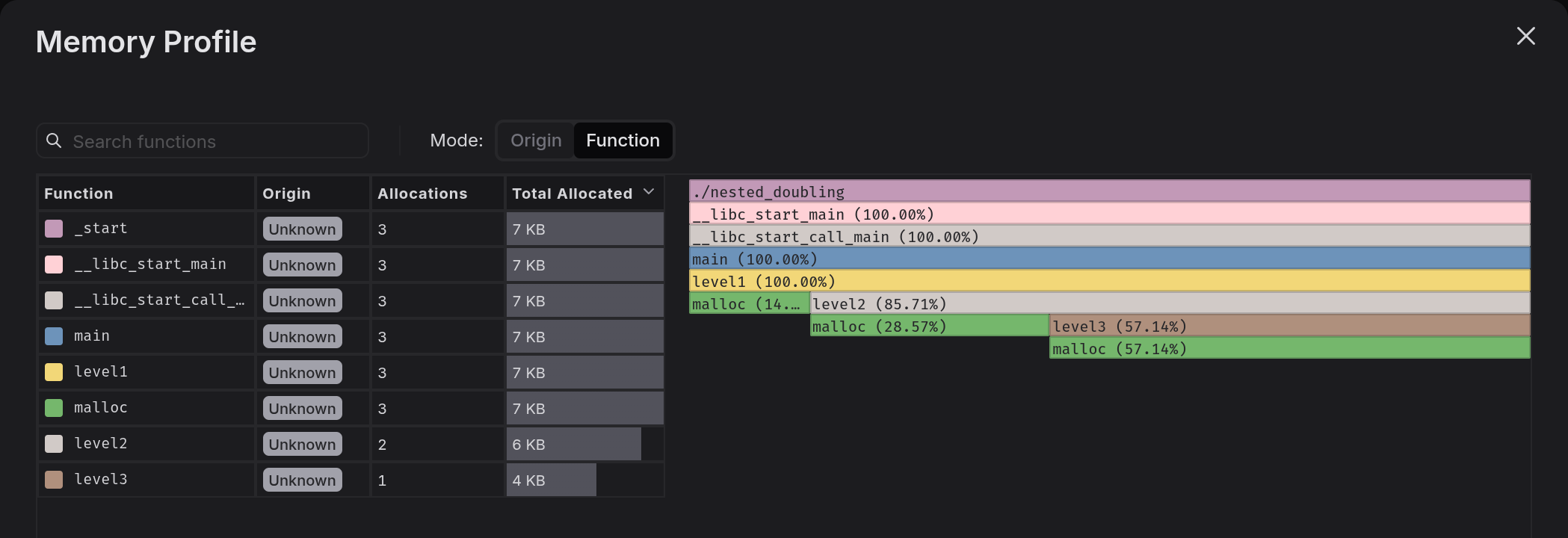
Memory profile showing allocations by function
-
Memory Usage Over Time: The timeline shows how the peak memory evolves
throughout benchmark execution. This graph reveals memory patterns, like
steady-state behavior, gradual growth, or periodic spikes.
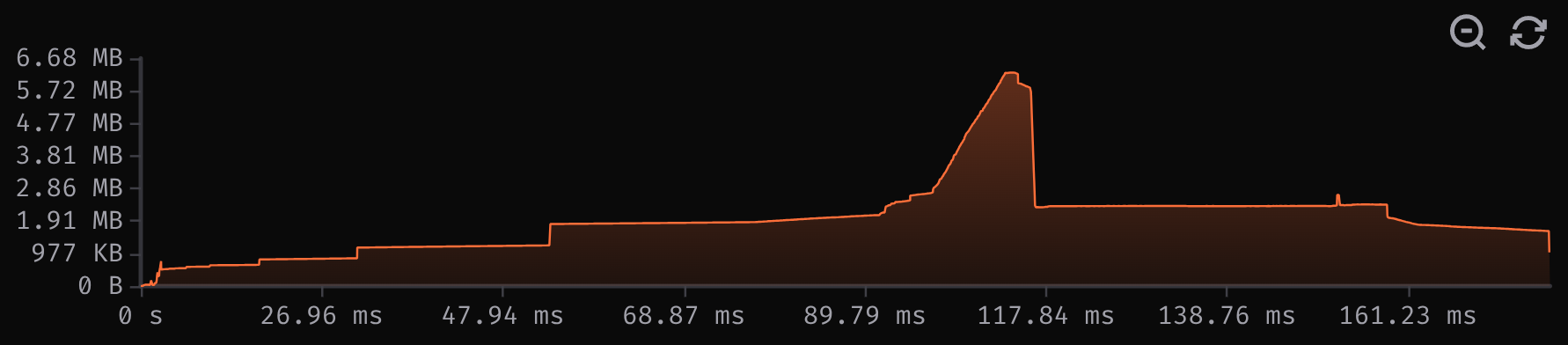
Memory usage over time
- Peak Physical Memory: The maximum memory resident in RAM at any single point during execution. This is the most important metric for memory-constrained systems, as it determines the minimum RAM requirements for your application and helps prevent out-of-memory errors. This metric is equivalent to Resident Set Size (RSS)
- Peak Allocated Memory: The maximum memory consumed at any single point during execution. This helps identify memory leaks and excessive memory usage, which can lead to performance degradation or crashes.
- Average Allocation Size: The average size of each heap allocation. Smaller allocations can lead to better cache locality and less memory fragmentation.
- Total Allocations: The total amount of heap memory allocated throughout your benchmark execution. Fewer heap allocations typically mean better cache locality and less pressure on the memory allocator, making this a key optimization target for performance-critical code.
- Allocation Count: The number of individual allocation operations performed during the benchmark. Since each allocation has overhead, high allocation counts can indicate excessive temporary object creation, impacting both performance and memory fragmentation.

Memory stats of a benchmark
Allocated vs. physical memory
The two metrics answer different questions. Peak Allocated Memory is the largest amount of memory requested through the application’s allocator (e.g.,malloc).
Peak Physical Memory is the largest amount of memory resident in RAM.
Physical memory can be lower than allocated memory when the application or
allocator requests large amounts of memory that it doesn’t immediately use. This
memory is lazily allocated by the operating system, meaning that it will only be
backed by physical memory once it’s actually accessed.
Physical memory can be higher than allocated memory when:
- Fragmentation is high.
- The allocator keeps memory after the application frees it.
- Large files, executables, shared libraries, or shared memory are included.
Usage with GitHub Actions
Requirements:CodSpeedHQ/action >= 4- A supported benchmark framework (see Language Support)
mode: memory in the
CodSpeed Action configuration:
- Instrument your benchmarks to capture memory metrics
- Run your benchmarks once with memory tracking enabled
- Upload results to the CodSpeed dashboard
Compatibility
Language Support
To use the memory instrument, ensure you meet the following minimum version requirements:
If you want to use memory with other languages, please reach out on
Discord or
email our support.
Supported Allocators
CodSpeed supports both dynamic and statically linked allocators. This is achieved by locating the libraries on your system in common paths, or by detecting allocator functions inside your benchmark binary. However, this means that if your allocator or benchmark binary is in a non-standard path, memory profiling can fail. Currently, the following allocators are supported: We’re planning to extend this list. If an allocator is missing, feel free to open an issue or contact us.Kernel support
Physical memory tracking is supported on Linux kernel 6.8 and newer. On older kernels, CodSpeed does not collect Peak Physical Memory. GitHub-hostedubuntu-22.04, ubuntu-24.04 and ubuntu-26.04 runners
currently meet this requirement.
Limitations
- Instrumentation overhead: The memory instrument tracks every individual allocation, which works best for small benchmarks with <2M allocations. For bigger benchmarks, try splitting the input or benchmark into smaller parts.
- Multi-threaded variance: Concurrent threads can allocate in non-deterministic order, causing allocation counts and peak memory to vary between runs.
- Spawned sub-processes: Allocations in spawned sub-processes are only tracked with dynamically linked allocators. Statically linked allocators (e.g. jemalloc in Rust) are not supported.
Best Practices
To get the most out of memory, consider these recommendations:- Run benchmarks with realistic workloads - Use production-representative data sizes and patterns to capture actual memory behavior rather than toy examples
- Focus optimization on hot paths - Prioritize reducing allocations in frequently called code, as allocation count in hot paths can significantly impact both memory and CPU performance
- Combine with CPU profiling - Memory and CPU metrics together reveal the full performance story; high allocation counts often correlate with CPU overhead
- Track trends over time - Compare memory metrics across benchmark runs to catch regressions early and validate that optimizations remain effective as code evolves
Next Steps

CPU Simulation
Learn about CodSpeed’s CPU simulation instrument for performance measurement
Creating Benchmarks
Learn how to write effective benchmarks for your code
Profiling
Explore automated profiling features for deeper performance insights
GitHub Actions Setup
Complete guide to setting up CodSpeed with GitHub Actions