

Back to Blog
debuggingperformancebenchmarking
Why glibc is faster on some Github Actions Runners
Matthias Heiden@not_matthias
16 minutesMarch 3rd, 2026
At CodSpeed we sometimes get reports that benchmarks regressed when making seemingly unrelated code changes. Common examples include updating documentation, changing different CI workflows, or adding/removing benchmarks.

This article aims to dig deeper into an investigation we recently had, where this was the case.
The Problem
A user reported that they added a new benchmark, and in the PR, the CodSpeed report showed performance regressions of seemingly unrelated benchmarks.
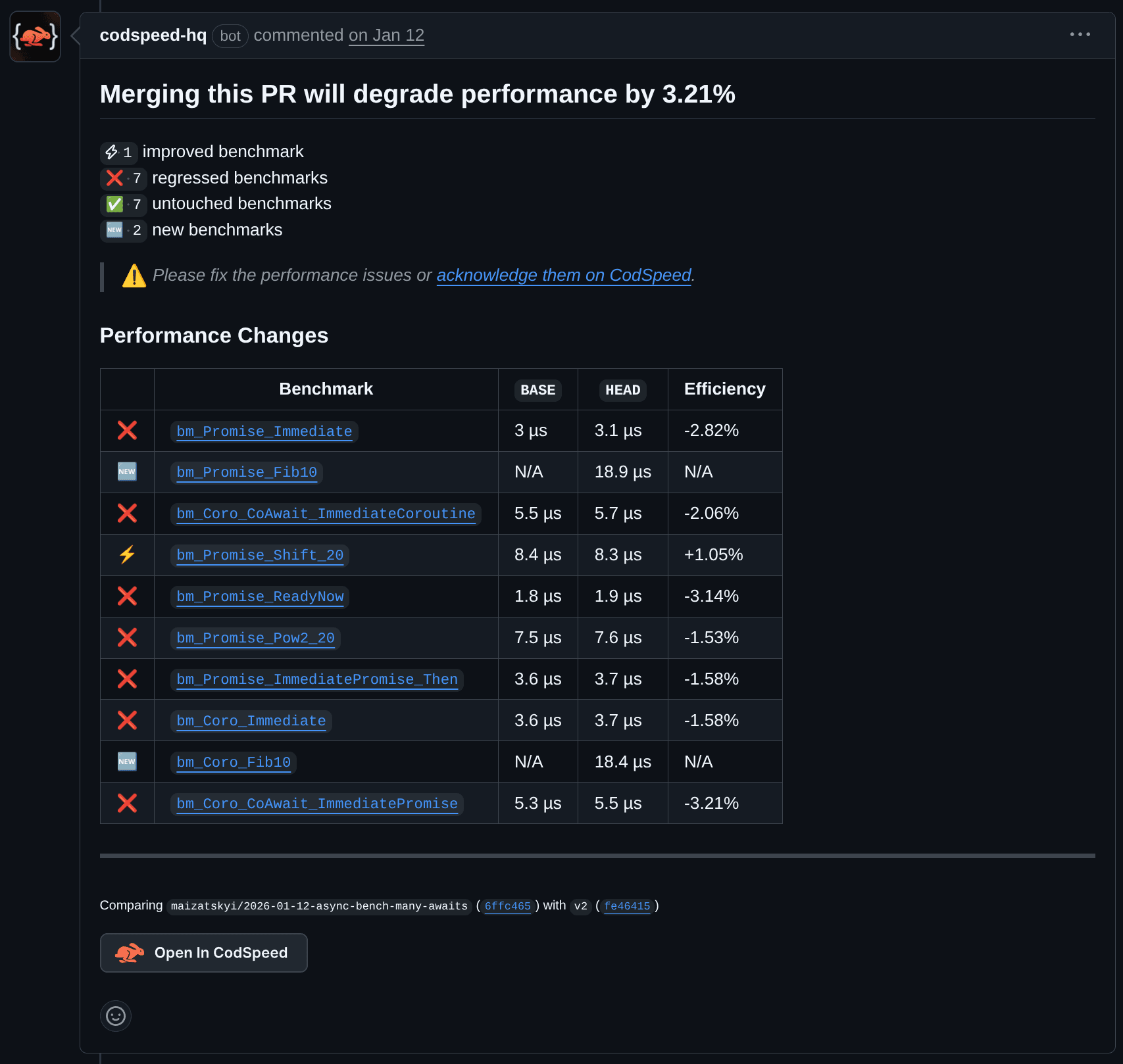
CodSpeed PR comment showing 8 regressed benchmarks after only adding a new benchmark
The code diff looked somewhat like this: It only added a new benchmark.
fn bench_foo() {
  foo()
}

fn bench_bar() {
  bar()
}

fn bench_baz() {
  baz()
}
How can the newly added and unrelated bench_baz function impact the
performance of bench_foo?
As programmers, our mental model has been trained to think in abstractions. If a
function foo takes 10ms, and we add another function, that surely shouldn't
affect the performance, right?
As it turns out, CPUs are more complex than we think. To achieve maximum performance, they use caching, threading, branch prediction, and many other techniques to squeeze out every last bit of performance. However, as we will see soon, this can lead to unexpected behavior.
How does the CPU Simulation instrument work?
Before trying to figure out what might be causing those issues, we'll have to understand how performance is measured. We're using a slightly modified version of Callgrind (a Valgrind tool) to instrument the built binary and analyze cache performance.
First, you have to build the binary with the CodSpeed integration for your language using simulation mode (which uses Valgrind). In Rust, you can use our cargo-codspeed CLI to build benchmarks with CodSpeed support:
cargo codspeed build -m simulationThen afterwards, you can run the benchmarks with our codspeed CLI:
codspeed exec -- cargo codspeed run -m simulationInternally, we then invoke callgrind with the right arguments that set up the caches, for example. In addition to that, we also disable callgrind at the start and have specific instrumentation inside the benchmark library to ensure only the benchmark code is benchmarked. This way, we already remove a lot of the noise. This is roughly equivalent to this:
valgrind \
  --tool=callgrind \
  --instr-atstart=no \
  --cache-sim=yes \
  ... \
  -- cargo codspeed run -m simulation
After running Valgrind and measuring the performance, we get multiple .out
files which contain the execution results of the benchmarks, including cache
misses, data reads/writes, and more. This data can then be used to estimate the
cycles and total time taken by a benchmark.
Looking at the variance
Callgrind executes the code on a virtual CPU, which has the advantage that (at least in theory) the execution is fully deterministic. However, when doing disk reads, network calls, or syscalls you can still introduce variance as your performance will differ based on external factors that aren't emulated.
To ensure that the benchmarks are deterministic, we compiled them once and then ran them 100 times on the same machine. The results are as follows:
| Benchmark | RSD | Mean (μs) | Median (μs) |
|---|---|---|---|
bm_Coro_CoAwait_ImmediateCoroutine | 0% | 5.719 | 5.719 |
bm_Coro_CoAwait_ImmediatePromise | 0% | 5.435 | 5.435 |
bm_Coro_Immediate | 0% | 3.718 | 3.718 |
bm_Coro_Pow2_20 | 0% | 18.248 | 18.248 |
bm_Coro_Shift_20 | 0% | 21.093 | 21.093 |
bm_Promise_Immediate | 0% | 3.084 | 3.084 |
bm_Promise_ImmediatePromise_Then | 0% | 3.751 | 3.751 |
bm_Promise_Pow2_20 | 0% | 7.569 | 7.569 |
bm_Promise_ReadyNow | 0% | 1.894 | 1.894 |
bm_Promise_Shift_20 | 0% | 8.458 | 8.458 |
We used the Relative Standard Deviation (RSD) to check the variance across all runs. As expected, it's 100% deterministic.
What happens to the variance when we rebuild and run the benchmarks in different jobs?
Running benchmarks on different jobs
Now, let's try to do the same experiment, but with each run executed on a different job. This can be done easily with GitHub Actions by using a matrix. We started with 10 runs, as we're only interested in cases with non-zero variance. If all runs have no variance, we can bump the runs to 100 to ensure statistically significant results.
benchmarks-parallel:
  name: Run benchmarks
  runs-on: ubuntu-24.04
  strategy:
    matrix:
      iteration: [1, 2, 3, 4, 5, 6, 7, 8, 9, 10]
  steps:
    - uses: actions/checkout@v5

    - name: Build benchmarks
      run: ...

    - name: Run benchmarks (iteration ${{ matrix.iteration }})
      uses: CodSpeedHQ/action@v4
      with:
        run: ...
        mode: simulation
Here are the aggregated results:
| Benchmark | RSD | Mean (μs) | Median (μs) |
|---|---|---|---|
bm_Coro_CoAwait_ImmediateCoroutine | 0% | 5.719 | 5.719 |
bm_Coro_CoAwait_ImmediatePromise | 0% | 5.435 | 5.435 |
bm_Coro_Immediate | 0% | 3.718 | 3.718 |
bm_Coro_Pow2_20 | 0.1% | 18.3 | 18.306 |
bm_Coro_Shift_20 | 0.505% | 21.401 | 21.435 |
bm_Promise_Immediate | 0% | 3.084 | 3.084 |
bm_Promise_ImmediatePromise_Then | 0.244% | 3.777 | 3.78 |
bm_Promise_Pow2_20 | 0.121% | 7.596 | 7.599 |
bm_Promise_ReadyNow | 0% | 1.894 | 1.894 |
bm_Promise_Shift_20 | 0% | 8.458 | 8.458 |
Now we suddenly have variance! This is an interesting insight, but there could be many explanations for this: compiler non-determinism, different linking order, newer toolchains or libraries, etc.
The variance observed here is already much smaller than what it would be when running code natively. In real-world examples, there are many sources of variance that can quickly add up and make even Callgrind benchmarks unstable. That's why it's really important to try to identify each source of variance and remove it.
Diving into the callgrind files
Callgrind creates a callgrind.out.<pid> file for each process, which contains
a lot of data about which functions were executed, how long they took, and what
costs they had. Costs in Valgrind are:
Ir: Number of instructions read (and executed)Dr: Number of data that was readDw: Number of data that was writtenI1mr: L1 instruction cache missesD1mr: L1 data cache read missesD1mw: L1 data cache write missesILmr: LL instruction cache missesDLmr: LL data cache read missesDLmw: LL data cache write misses
In this case, we're looking at the benchmark for bm_Coro_Shift_20, which had
the most variance across 10 runs. We're only interested in the last line for
now, which describes the total cost of the execution of this benchmark.
part: 74

desc: Timerange: Basic block 20475222 - 20483854
desc: Trigger: Client Request: src/kj/async-bench.c++::bm_Coro_Shift_20

...

events: Ir    Dr   Dw   I1mr D1mr D1mw ILmr DLmr DLmw
totals: 20577 5984 5064 185  60   177  185  60   177
We can compare this across all runs to see how they differ:
| run | Ir | Dr | Dw | I1mr | D1mr | D1mw | ILmr | DLmr | DLmw |
|---|---|---|---|---|---|---|---|---|---|
| 1 | 20901 | 6024 | 5091 | 185 | 65 | 180 | 185 | 65 | 180 |
| 2 | 20901 | 6024 | 5091 | 185 | 65 | 180 | 185 | 65 | 180 |
| 3 | 20901 | 6024 | 5091 | 185 | 65 | 180 | 185 | 65 | 180 |
| 4 | 20901 | 6024 | 5091 | 185 | 65 | 180 | 185 | 65 | 180 |
| 5 | 20577 | 5984 | 5064 | 185 | 60 | 177 | 185 | 60 | 177 |
| 6 | 20901 | 6024 | 5091 | 185 | 65 | 180 | 185 | 65 | 180 |
| 7 | 20901 | 6024 | 5091 | 185 | 65 | 180 | 185 | 65 | 180 |
| 8 | 20901 | 6024 | 5091 | 185 | 65 | 180 | 185 | 65 | 180 |
| 9 | 20901 | 6024 | 5091 | 185 | 65 | 180 | 185 | 65 | 180 |
| 10 | 20901 | 6024 | 5091 | 185 | 65 | 180 | 185 | 65 | 180 |
If you take a close look at the table, you can see that Run 5 seems different. For some reason, we have fewer executed instructions, fewer data reads and writes, and also fewer data cache misses. How is this possible?
My first assumption was that it must be because the compiler optimized the code better. Yet when we compute the checksum of the built binary of each run, we have this result:
$ for dir in run-{1..10}; do sha1sum "$dir/async-bench"; done
0f6aad3ccdf626b3e141a262a7907f64a1c4dbfe  run-1/async-bench
0f6aad3ccdf626b3e141a262a7907f64a1c4dbfe  run-2/async-bench
0f6aad3ccdf626b3e141a262a7907f64a1c4dbfe  run-3/async-bench
0f6aad3ccdf626b3e141a262a7907f64a1c4dbfe  run-4/async-bench
0f6aad3ccdf626b3e141a262a7907f64a1c4dbfe  run-5/async-bench
0f6aad3ccdf626b3e141a262a7907f64a1c4dbfe  run-6/async-bench
0f6aad3ccdf626b3e141a262a7907f64a1c4dbfe  run-7/async-bench
0f6aad3ccdf626b3e141a262a7907f64a1c4dbfe  run-8/async-bench
0f6aad3ccdf626b3e141a262a7907f64a1c4dbfe  run-9/async-bench
0f6aad3ccdf626b3e141a262a7907f64a1c4dbfe  run-10/async-bench
All binaries have the same hash! We're running all builds on ubuntu-24.04, and
they result in the same binary, yet the results are different?
Hitting the jackpot
Almost out of ideas, I wrote down all the areas where I thought the issue could be:
- System (e.g., different stack offsets, heap fragmentation, ASLR, ...)
- Valgrind bug (non-deterministic bug? some kind of race condition?)
- Benchmark (maybe we have a bug)
While checking the execution order in our logs by diffing them, I noticed something very interesting: Run 5 (the one with variance) has different cache sizes compared to the 9 other runs:
Run on (4 X 3491.87 MHz CPUs)
CPU Caches:
  L1 Data 48 KiB (x2)
  L1 Instruction 32 KiB (x2)
  L2 Unified 1280 KiB (x2)
  L3 Unified 49152 KiB (x1)
Here are the caches of the 9 other runs:
Run on (4 X 3244.71 MHz CPUs)
CPU Caches:
  L1 Data 32 KiB (x2)
  L1 Instruction 32 KiB (x2)
  L2 Unified 512 KiB (x2)
  L3 Unified 32768 KiB (x1)
The cache difference alone doesn't explain the difference, as this only explains the decreased last-level cache misses, but not the reduced data reads/writes.
However, if the caches are different, then the CPU also has to be different. And it turns out that even if you use a pinned runner image on GitHub Actions, they assign you different CPUs. In our case, we had those:
- Intel(R) Xeon(R) Platinum 8370C CPU @ 2.80GHz (1/10 runs)
- AMD EPYC 7763 64-Core Processor (9/10 runs)
When and how these are assigned is completely random and just depends on the available resources.
Why does the performance differ?
After looking deeper into the callgrind trace, we discovered that the majority
of performance differences are within glibc's implementation of malloc.
Since both machines use the identical version (GLIBC 2.39), the issue has to be
the environment.
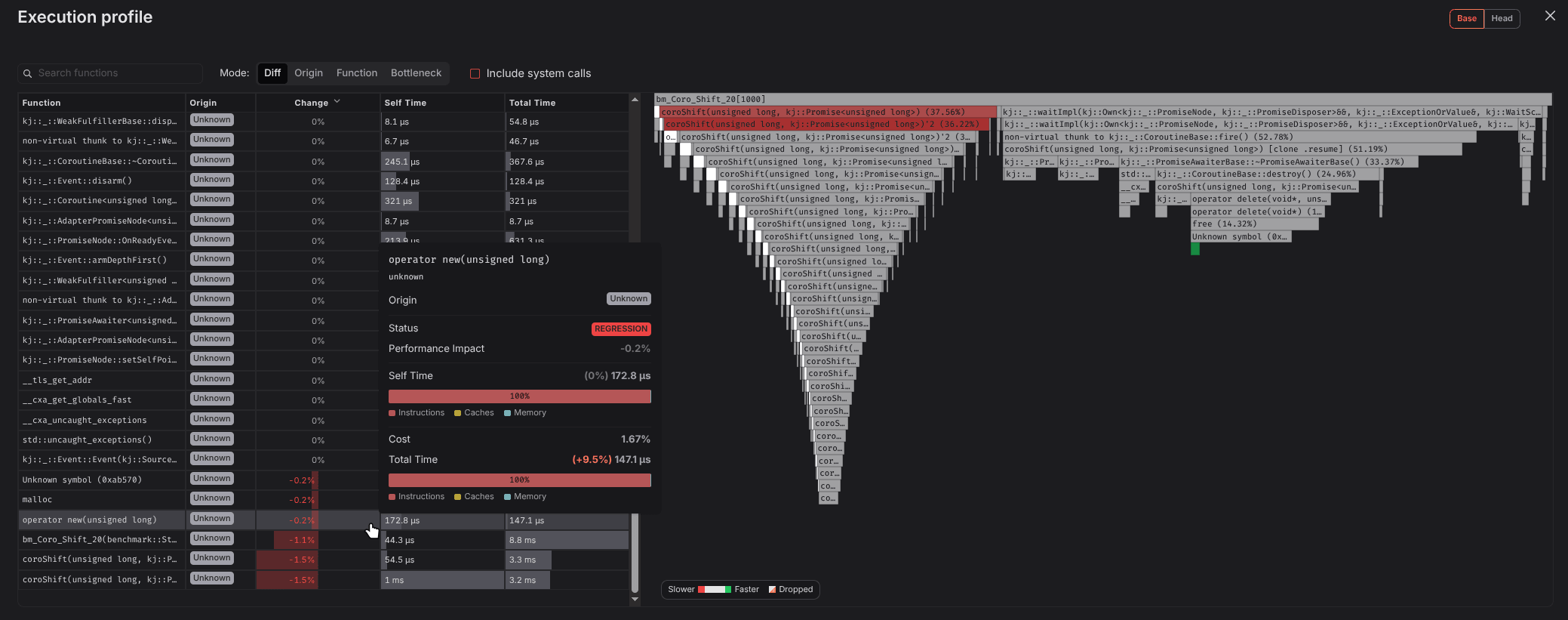
Execution profile showing that most performance differences occur in malloc from glibc
We can use the lscpu
command to extract and compare different CPU features. Out of 100+ features, the
majority (77) are shared across Intel and AMD. If you are interested in specific
instructions, look them up on the
x86 Instruction Set Reference or
List of x86 instructions on Wikipedia.
3dnowprefetch, abm, adx, aes, aperfmperf, apic, avx, avx2, bmi1, bmi2, clflush,
clflushopt, clwb, cmov, constant_tsc, cpuid, cx16, cx8, de, erms, f16c, fma,
fpu, fsgsbase, fsrm, fxsr, ht, hypervisor, invpcid, lahf_lm, lm, mca, mce, mmx,
movbe, msr, mtrr, nonstop_tsc, nopl, nx, pae, pat, pcid, pclmulqdq, pdpe1gb,
pge, pni, popcnt, pse, pse36, rdpid, rdrand, rdseed, rdtscp, rep_good, sep,
sha_ni, smap, smep, sse, sse2, sse4_1, sse4_2, ssse3, syscall, tsc,
tsc_known_freq, tsc_reliable, umip, vaes, vme, vpclmulqdq, xgetbv1, xsave,
xsavec, xsaveopt, xsaves
The Intel CPU has 27 additional flags, the majority of which are for
AVX-512 support. Others are related to
Transactional Memory
(rtm, hle) and
Intel Virtualization Extensions
(vmx, ept, ept_ad, vpid, ...).
arch_capabilities, avx512_bitalg, avx512_vbmi2, avx512_vnni, avx512_vpopcntdq,
avx512bw, avx512cd, avx512dq, avx512f, avx512ifma, avx512vbmi, avx512vl, ept,
ept_ad, gfni, hle, la57, rtm, ss, tpr_shadow, tsc_adjust, tsc_deadline_timer,
vmx, vnmi, vpid, x2apic, xtopology
On AMD, there are 25 custom flags for
AMD's version of Virtualization Extension
(svm, npt, vmmcall, ...),
SSE4a, security features like
user_shstk for User Shadow Stack
support, and even more specific instructions like
clzero to zero a cache line.
arat, clzero, cmp_legacy, cr8_legacy, decodeassists, extd_apicid, flushbyasid,
fxsr_opt, misalignsse, mmxext, npt, nrip_save, osvw, pausefilter, pfthreshold,
rdpru, sse4a, svm, topoext, tsc_scale, user_shstk, v_vmsave_vmload, vmcb_clean,
vmmcall, xsaveerptr
Overall, the Intel CPU provides more features that can greatly improve performance. But as we previously saw, the machines also have different cache sizes, which has a big influence on performance: Intel is clearly better across all of them.
| Intel Xeon 8370C | AMD EPYC 7763 | |
|---|---|---|
| L1 Data Cache | 48 KiB (+50%) | 32 KiB |
| L2 Unified Cache | 1280 KiB (+150%) | 512 KiB |
| L3 Unified Cache | 48 MB (+50%) | 32 MB |
To understand why the performance is faster, we have to dig into the source code of GLIBC and figure out what tricks they employ.
Why is GLIBC faster on different machines?
As it is one of the most used libraries on Linux systems, clearly a lot of work was invested to make it as fast as possible. And this can only be done if you tailor the implementations to the underlying system/CPU.
For example, they detect the number of CPU cores to decide how many instances are required to reduce lock contention in multi-threaded programs. In our case, both CPUs have 4 cores, so this wasn't the issue.
int n = __get_nprocs ();

if (n >= 1)
  narenas_limit = NARENAS_FROM_NCORES (n);
else
  /* We have no information about the system.  Assume two
      cores.  */
  narenas_limit = NARENAS_FROM_NCORES (2);
}
They also
detect the cache sizes,
which helps decide whether data should be written directly to main memory to
prevent trashing the cache. This is done by using
non-temporal instructions like MOVNTI or
MOVNTQ. If you want to copy 16MB of memory with 8MB of cache, then it will not
use the cache. However, if you have 16MB of cache, then it will use the cache.
tunable_size = TUNABLE_GET (x86_data_cache_size, long int, NULL);
/* NB: Ignore the default value 0.  */
if (tunable_size != 0)
  data = tunable_size;

tunable_size = TUNABLE_GET (x86_shared_cache_size, long int, NULL);
/* NB: Ignore the default value 0.  */
if (tunable_size != 0)
  shared = tunable_size;
Another optimization is the detection of specialized CPU instructions. CISC architectures achieve performance speedups by adding instructions in hardware for common operations like video encoding or cryptography. However, these instruction set extensions vary greatly amongst CPUs and depend on the release date and brand.
This can be done by building a single shared library that contains multiple
implementations using different CPU features that are then dynamically
dispatched at runtime. For example, Rust provides a
is_x86_feature_detected! macro
that depends on cpuid to detect CPU
features.
#[cfg(any(target_arch = "x86", target_arch = "x86_64"))]
pub fn copy_memory(src: &[u8], dst: &mut [u8]) {
    if is_x86_feature_detected!("avx2") {
        // Use AVX2 instructions (256-bit SIMD)
        // Can copy 32 bytes per instruction
        avx2_memcpy(src, dst)
    } else if is_x86_feature_detected!("sse4.2") {
        // Use SSE4.2 instructions (128-bit SIMD)
        // Can copy 16 bytes per instruction
        sse42_memcpy(src, dst)
    } else {
        // Fallback to scalar implementation
        // Copies 8 bytes per instruction on 64-bit
        dst.copy_from_slice(src);
    }
}
However, this bloats the binary and can complicate the build process. In GLIBC 2.33+ there is a new feature that allows building a library multiple times, with different hardware features. Instead of doing dynamic dispatch in the library, the linker/loader will load the maximum version supported by the CPU.
/usr/lib/glibc-hwcaps/x86-64-v4/libfoo0.so
/usr/lib/glibc-hwcaps/x86-64-v3/libfoo0.so
/usr/lib/glibc-hwcaps/x86-64-v2/libfoo0.so
/usr/lib/libfoo0.so
While these optimizations make GLIBC incredibly fast, they can unfortunately also introduce variance in benchmarks. Increased variance leads to small regressions slipping through (see our previous blog post), which can have big impacts on performance over time. Because of this, it is really important to find a solution and fix the variance.
How to fix it?
First of all: Do you even need to fix it? If you have macro-benchmarks taking more than 1ms, then the variance introduced by different CPUs should be negligible. However, if you do many allocations or memory operations in your hot path, you could still be affected.
On GitHub, you can only control the operating system, architecture, and image of Large Runners (runners with more RAM, CPU, and disk space), but not the underlying CPU. Despite that, we managed to experimentally confirm that you get the same machine across 100 runs when using 8 VCPUs. However, if you need absolute stability, at CodSpeed, we provide Macro Runners, which are dedicated bare-metal machines, configured to provide a stable, isolated environment for running benchmarks. On them, your benchmarks will always run on the same CPU, while having the least amount of variance.
Alternatively, you could turn off GLIBC feature detection using
GLIBC_TUNABLES.
This can be done by setting an environment variable with features you don't
want to use. Sadly, this will have to be done for each CPU feature, which makes
it very hacky and not easily maintainable.
$ GLIBC_TUNABLES=glibc.cpu.hwcaps=-AVX2 <your-bench-cmd>Another solution could be to modify callgrind to "spoof" the supported CPU features. Currently, they detect and use newer features as they also speed up the emulation process. This would overall be the best solution, as the virtual CPU stays the same across different CPUs but comes with a few tradeoffs like deciding the minimum required CPU features or the maintenance burden of forking callgrind. Since we already have a fork, we'll likely implement it in the future to make benchmarks even more stable.
Or, rather than trying to force the runner to use the same CPU, you could detect and log it to be aware that regressions are caused by this. That's the approach that we chose to take at the moment, as it's not just the CPU that can change, but also the compiler or library version.
Conclusion
This investigation showed that benchmark results are tightly bound to the environment in which they are run. Some factors might be obvious, like the CPU features or cache sizes, while others are almost undetectable if you don't know about them.
We recommend either using Large Runners or our Macro Runners instances, so that you always have the same CPU. We're also working on a feature that will tell you when the environment (CPU, compiler, libraries, ...) changed to make it easier to identify and understand regressions.
And as it turns out, the discovery of different CPUs alone didn't fix the regressions that were reported. Stay tuned for our next article that will explain another commonly overlooked regression cause (hint: it's related to memory fragmentation).
To stay up-to-date, follow us on X, join our Discord or subscribe to our RSS feed.
Share this:
You may also like:

How to Benchmark Rust Code?

How to Benchmark Python Code?
We handle performance, so you can focus on shipping.
Talk to our team about deployment, security, and scale; or start building today.