> ## Documentation Index
> Fetch the complete documentation index at: https://codspeed.io/docs/llms.txt
> Use this file to discover all available pages before exploring further.

# Integrating with a Repository Provider

> CodSpeed integrates directly with your repository provider to deliver performance insights where your team already collaborates.

export const GitLabIcon = props => <svg xmlns="http://www.w3.org/2000/svg" className="h-6 w-6" width={31} height={31} viewBox="0 0 31 31" fill="none" {...props}>
    <g clipPath="url(#a)">
      <path fill="#E24329" d="m29.301 12.446-.041-.105-3.968-10.356a1.034 1.034 0 0 0-1.026-.65c-.217.012-.425.09-.597.224-.17.137-.292.324-.352.534l-2.68 8.197H9.79l-2.68-8.197a1.041 1.041 0 0 0-.352-.536 1.063 1.063 0 0 0-1.214-.065c-.184.117-.327.289-.408.492l-3.976 10.35-.04.106a7.368 7.368 0 0 0 2.445 8.515l.013.011.037.026 6.044 4.526 2.99 2.264 1.822 1.375a1.224 1.224 0 0 0 1.482 0l1.821-1.375 2.99-2.264 6.082-4.553.015-.013a7.371 7.371 0 0 0 2.441-8.506Z" />
      <path fill="#FC6D26" d="m29.302 12.446-.04-.105a13.404 13.404 0 0 0-5.336 2.399l-8.715 6.59 5.551 4.195 6.081-4.554.015-.012a7.371 7.371 0 0 0 2.444-8.513Z" />
      <path fill="#FCA326" d="m9.656 25.525 2.99 2.263 1.822 1.375a1.225 1.225 0 0 0 1.482 0l1.821-1.375 2.99-2.263s-2.586-1.957-5.553-4.196c-2.968 2.24-5.552 4.196-5.552 4.196Z" />
      <path fill="#FC6D26" d="M6.493 14.74a13.386 13.386 0 0 0-5.334-2.405l-.04.105a7.368 7.368 0 0 0 2.445 8.516l.013.01.037.026 6.044 4.527 5.552-4.196-8.717-6.584Z" />
    </g>
    <defs>
      <clipPath id="a">
        <path fill="#fff" d="M.055.097h30.27v30.27H.056z" />
      </clipPath>
    </defs>
  </svg>;

export const GitHubIcon = props => <svg xmlns="http://www.w3.org/2000/svg" className="h-6 w-6" viewBox="0 0 32 31" width={32} height={31} fill="none" {...props}>
    <path fill="#F4F4F5" fillRule="evenodd" d="M16.093 1.187c-7.778 0-14.066 6.334-14.066 14.17A14.159 14.159 0 0 0 11.645 28.8c.7.141.955-.305.955-.68 0-.329-.023-1.455-.023-2.628-3.913.845-4.728-1.69-4.728-1.69-.628-1.641-1.56-2.064-1.56-2.064-1.28-.867.093-.867.093-.867 1.42.093 2.166 1.454 2.166 1.454 1.258 2.158 3.284 1.549 4.099 1.173.116-.915.489-1.548.885-1.9-3.121-.329-6.404-1.549-6.404-6.992 0-1.548.558-2.815 1.443-3.8-.14-.352-.629-1.807.14-3.754 0 0 1.188-.376 3.866 1.454a13.524 13.524 0 0 1 3.516-.469c1.188 0 2.399.164 3.517.47 2.678-1.83 3.866-1.455 3.866-1.455.768 1.947.279 3.402.14 3.754.908.985 1.443 2.252 1.443 3.8 0 5.443-3.283 6.64-6.427 6.992.512.445.954 1.29.954 2.627 0 1.9-.023 3.426-.023 3.895 0 .375.257.821.955.68a14.16 14.16 0 0 0 9.618-13.443c.023-7.836-6.288-14.17-14.043-14.17Z" clipRule="evenodd" />
  </svg>;

By connecting with your Git forge, CodSpeed brings performance data directly
into your development workflow through pull request comments and status checks.

## Supported Repository Providers

<Columns cols={2}>
  <Card horizontal title="GitHub" href="/integrations/providers/github" icon={<GitHubIcon />} />

  <Card horizontal title="GitLab" href="/integrations/providers/gitlab" icon={<GitLabIcon />} />
</Columns>

<Info>
  If your provider is not listed here, please [send us an
  email](mailto:support@codspeed.io) or contact us on
  [Discord](https://discord.com/invite/MxpaCfKSqF).
</Info>

## Benefits

### Performance Reports in Pull Requests

<Tip>
  Performance results appear automatically in pull request comments, making
  performance data visible to all reviewers.
</Tip>

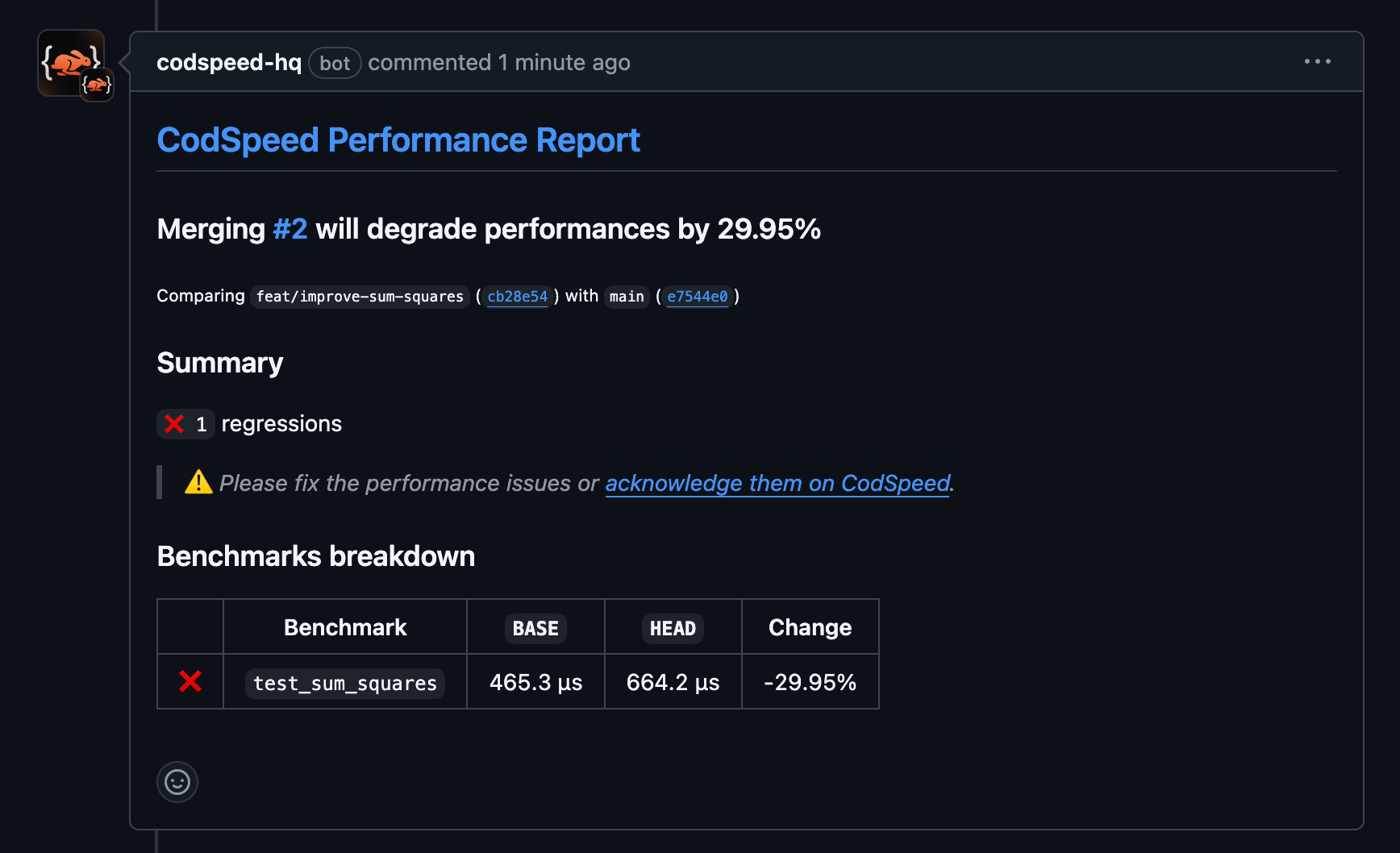
Instead of hunting through CI logs or external dashboards, your team gets
performance insights directly in the pull request interface. CodSpeed
automatically posts detailed performance reports as comments, showing benchmark
results, comparisons with the base branch, and highlighting any significant
changes.

<Frame caption="Pull Request Performance Report showing the performance regression">
  <img src="https://mintcdn.com/codspeed/jKaxX6yy-Kzw1C-0/assets/quickstart-regression-pr.png?fit=max&auto=format&n=jKaxX6yy-Kzw1C-0&q=85&s=7e5b2928d21552a5ec8e27e859448bbf" alt="Pull Request Regression Result" className="w-full max-w-lg mx-auto" width="1736" height="1058" data-path="assets/quickstart-regression-pr.png" />
</Frame>

### Automated Status Checks

<Tip>
  Configure status checks to prevent merging pull requests that introduce
  performance regressions beyond your tolerance thresholds.
</Tip>

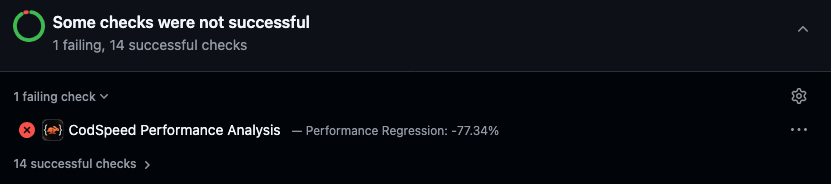
Repository provider integration enables CodSpeed to participate in your branch
protection rules through status checks. You can configure
[performance checks](/features/performance-checks/) to automatically block
merges when performance degrades beyond acceptable limits, ensuring performance
standards are enforced at the repository level.

<Frame caption="Pull Request Regression Failing GitHub Checks">
  <img src="https://mintcdn.com/codspeed/q5Q3QnyKsjTld2tv/assets/quickstart-regression-checks.png?fit=max&auto=format&n=q5Q3QnyKsjTld2tv&q=85&s=cafac36f9a791d06187e998b6ee8d6d7" alt="Pull Request Checks failing because of the performance regression" className="w-full max-w-lg mx-auto" width="831" height="184" data-path="assets/quickstart-regression-checks.png" />
</Frame>

### Centralized Performance Tracking

<Info>
  All performance data is linked to specific commits, branches, and pull
  requests, creating a comprehensive audit trail.
</Info>

Your repository becomes the single source of truth for both code changes and
their performance implications. CodSpeed maintains performance history tied
directly to your Git commits, making it easy to understand when and why
performance changed.