> ## Documentation Index
> Fetch the complete documentation index at: https://codspeed.io/docs/llms.txt
> Use this file to discover all available pages before exploring further.
# Running Benchmarks in CircleCI
> Learn how to setup CodSpeed and run benchmarks within your CircleCI pipeline
Running benchmarks in CI environments presents unique challenges due to the
inherent noise and variability of shared cloud infrastructure. Standard hosted
runners can exhibit significant performance variance.
Read our detailed post on [how CI noise affects benchmark
consistency](https://codspeed.io/blog/benchmarks-in-ci-without-noise).
[CodSpeed instruments](/docs/instruments) are designed to mitigate these challenges
and gather accurate performance data even in noisy environments. The easiest way
to get started running benchmarks in CircleCI is to use the
[CodSpeed Runner](https://github.com/CodSpeedHQ/codspeed) directly.
## Prerequisites
* A repository hosted on GitHub, enabled on
[CodSpeed](https://app.codspeed.io/login). CodSpeed reports the results on the
pull requests of your [repository provider](/docs/integrations/providers), which is
GitHub for a CircleCI pipeline.
* [Benchmarks](/docs/benchmarks/overview) in that repository.
* The repository set up as a CircleCI project. Refer to the CircleCI
documentation on
[creating a project](https://circleci.com/docs/guides/getting-started/create-project/).
For now, only the following OS and versions are supported on the runners:
* Ubuntu 22.04 and later
* Debian 12 and later
CodSpeed recommends giving the benchmarks a pipeline of their own, so the
pipelines you already have keep running as they do today. This needs the
CircleCI GitHub App, which can be installed alongside an existing GitHub OAuth
pipeline.
On the legacy GitHub OAuth integration, a project holds a single pipeline and
its configuration has to live in `.circleci/config.yml`, so the benchmarks job
goes in that file instead of a dedicated one. CodSpeed supports it: see
[legacy GitHub OAuth projects](/docs/integrations/ci/circleci/configuration#legacy-github-oauth-projects).
## 1. Add the benchmarks job
Create a `.circleci/codspeed.yml` file with a job that installs the CodSpeed CLI
and runs your benchmarks with it:
```yaml .circleci/codspeed.yml theme={null}
version: 2.1
jobs:
benchmarks:
machine:
image: ubuntu-2404:current
steps:
- checkout
# ...
# Setup your environment here:
# - Configure your Python/Rust/Node.js version
# - Install your dependencies
# - Build your benchmarks (if using a compiled language)
# ...
- run:
name: Install the CodSpeed CLI
command: |
curl -fsSL https://codspeed.io/v5.1.0/install.sh | bash
echo 'export PATH="$HOME/.cargo/bin:$PATH"' >> "$BASH_ENV"
- run:
name: Run the benchmarks
command: |
codspeed run --mode simulation -- ""
workflows:
benchmarks:
jobs:
- benchmarks
```
### Sample configurations
```yaml .circleci/codspeed.yml theme={null}
version: 2.1
jobs:
benchmarks:
docker:
- image: cimg/python:3.12
steps:
- checkout
- run: pip install -r requirements.txt
- run:
name: Install the CodSpeed CLI
command: |
curl -fsSL https://codspeed.io/v5.1.0/install.sh | bash
echo 'export PATH="$HOME/.cargo/bin:$PATH"' >> "$BASH_ENV"
- run:
name: Run the benchmarks
command: |
codspeed run --mode simulation -- pytest tests/ --codspeed
workflows:
benchmarks:
jobs:
- benchmarks
```
More info on [how to setup Python benchmarks](/docs/benchmarks/python).
```yaml .circleci/codspeed.yml theme={null}
version: 2.1
jobs:
benchmarks:
docker:
- image: cimg/rust:1.82
steps:
- checkout
- run:
name: Install the CodSpeed CLI
command: |
curl -fsSL https://codspeed.io/v5.1.0/install.sh | bash
echo 'export PATH="$HOME/.cargo/bin:$PATH"' >> "$BASH_ENV"
- run: cargo install cargo-codspeed --locked
# Build the benchmark target(s)
- run: cargo codspeed build
- run:
name: Run the benchmarks
command: |
codspeed run --mode simulation -- cargo codspeed run
workflows:
benchmarks:
jobs:
- benchmarks
```
More info on [how to setup Rust benchmarks](/docs/benchmarks/rust).
```yaml .circleci/codspeed.yml theme={null}
version: 2.1
jobs:
benchmarks:
docker:
- image: cimg/node:22.11
steps:
- checkout
- run: npm install
- run:
name: Install the CodSpeed CLI
command: |
curl -fsSL https://codspeed.io/v5.1.0/install.sh | bash
echo 'export PATH="$HOME/.cargo/bin:$PATH"' >> "$BASH_ENV"
- run:
name: Run the benchmarks
command: |
codspeed run --mode simulation -- node -r esbuild-register benches/bench.ts
workflows:
benchmarks:
jobs:
- benchmarks
```
More info on [how to setup Node.js benchmarks](/docs/benchmarks/nodejs).
Commit the file on a branch. Nothing builds it yet: the pipeline that will run
it is created next.
## 2. Create the benchmarks pipeline
In **Project Settings** → **Project Setup**, add a pipeline:
* **Config source** and **Checkout source**: your repository.
* **Config filepath**: `.circleci/codspeed.yml`, the file from the previous
step.
Then add a GitHub App trigger to that pipeline, on the **PR opened or pushed to,
default branch and tag pushes** event. It now builds:
* Every push to the default branch. These runs record the baseline that pull
requests are compared against.
* Pull requests, which is what CodSpeed reports on.
Pipelines and their triggers are configured in the CircleCI web app, not in a
config file. Refer to the CircleCI documentation on
[pipelines](https://circleci.com/docs/guides/orchestrate/pipelines/) and
[GitHub trigger event options](https://circleci.com/docs/guides/orchestrate/github-trigger-event-options/)
for the other events a trigger supports.
## 3. Open a pull request
Open a pull request from the branch carrying `.circleci/codspeed.yml`. The
benchmarks pipeline runs, and the pull request receives a performance report
comment and a status check:
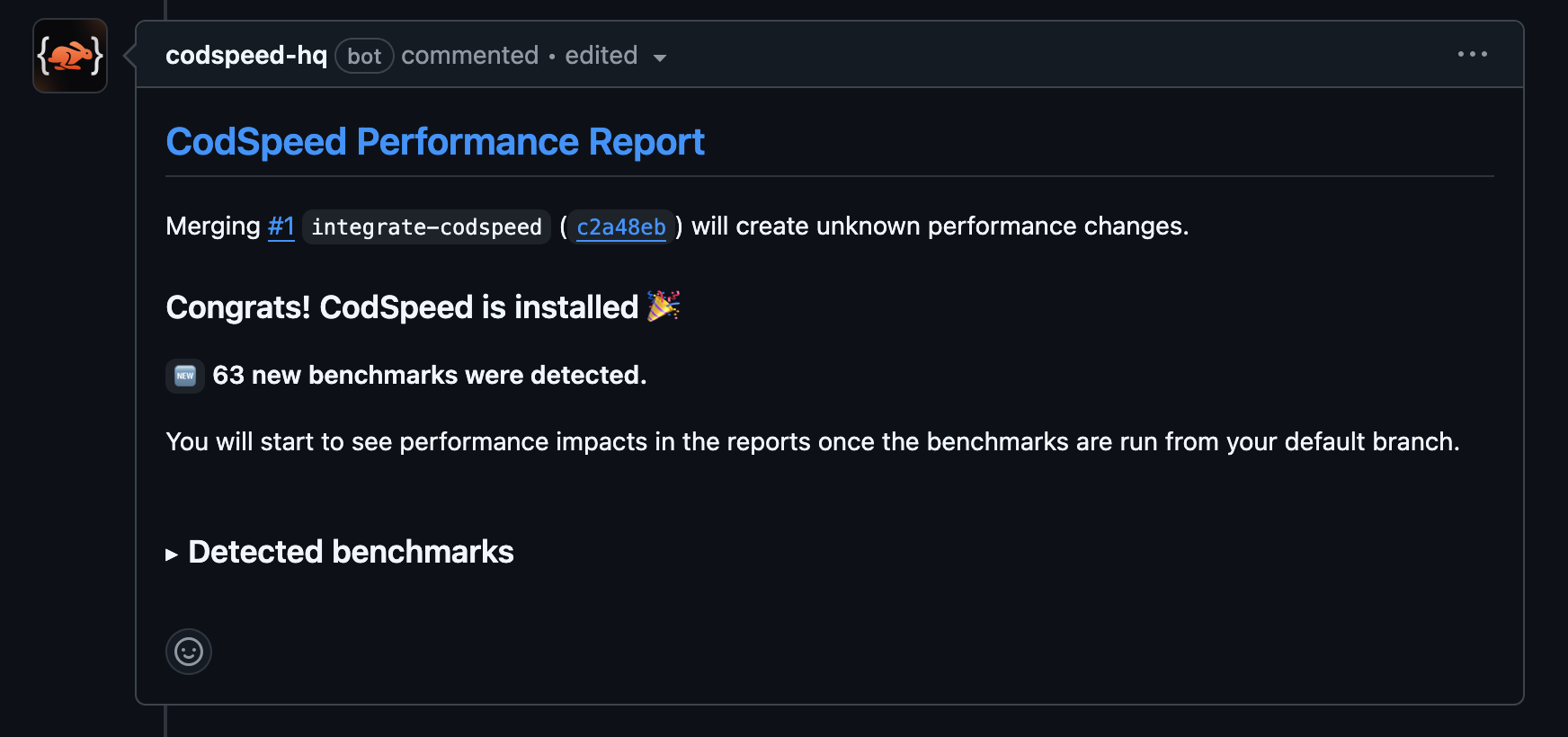
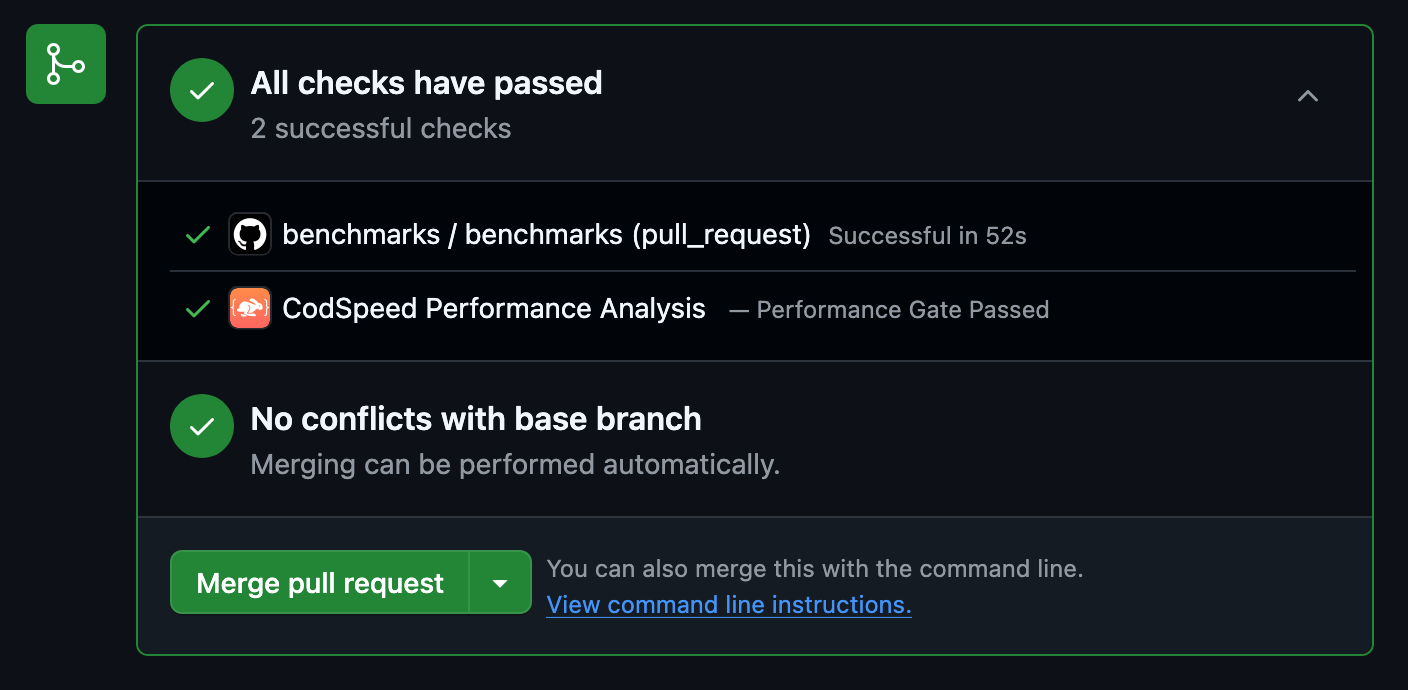 Merge it to record the first baseline on your default branch, and the next pull
requests are compared against it.
If you opened the pull request before creating the pipeline, push a new commit
to the branch. CircleCI does not rebuild a branch it has already built.
## 4. Next Steps
Now that everything is up and running (and hopefully green 🎉), you can start
enhancing your pipeline to get the most out of CodSpeed.
Learn how to configure authentication methods and advanced options for
CircleCI
Understand the performance metrics generated by CodSpeed
Make sure you or team members never merge unexpected performance regressions
Get detailed flame graphs and performance traces for your benchmarks
Run your benchmarks in parallel to speed up your CI
Merge it to record the first baseline on your default branch, and the next pull
requests are compared against it.
If you opened the pull request before creating the pipeline, push a new commit
to the branch. CircleCI does not rebuild a branch it has already built.
## 4. Next Steps
Now that everything is up and running (and hopefully green 🎉), you can start
enhancing your pipeline to get the most out of CodSpeed.
Learn how to configure authentication methods and advanced options for
CircleCI
Understand the performance metrics generated by CodSpeed
Make sure you or team members never merge unexpected performance regressions
Get detailed flame graphs and performance traces for your benchmarks
Run your benchmarks in parallel to speed up your CI