> ## Documentation Index
> Fetch the complete documentation index at: https://codspeed.io/docs/llms.txt
> Use this file to discover all available pages before exploring further.
# Benchmark Variance
> Learn why micro-benchmarks can improve/regress despite no code changes, and how to identify the causes.
CodSpeed's CPU Simulation is based on Valgrind, which operates on **compiled
machine code** produced by your toolchain. The machine code is executed on a
simulated CPU, which ensures that the performance is consistent across multiple
runs.
However, there are cases where the performance of a benchmark regresses, despite
not making any changes to the underlying code. This can happen due to changes in
the cache behavior, as cache misses are also included in the
[cycle calculation](/instruments/cpu#estimating-cycles).
This article explains **regressions in micro-benchmarks**, caused by different cache behavior. These regressions are typically \< 1μs, which is why they are often not noticeable in walltime measurements.
## Toolchain Updates
It is generally recommended to pin your toolchain (e.g. compilers, dependencies,
etc.) to avoid unintended changes, which can be bugs, malware but also
**performance regressions**.
**Common issues:**
* **Stable compiler toolchains:** Using `dtolnay/rust-toolchain@stable` in
Github Actions is non-deterministic. When Rust stable updates (e.g. from 1.92
to 1.93), your toolchain and Rust compiler will update, which can change
[compiler optimizations](#compiler-non-determinism).
* **CI runner/image updates:** `runs-on: ubuntu-latest` can move to a new Ubuntu
release, changing glibc, LLVM, and other system libraries.
* **Dependency updates:** Changes in `Cargo.lock` (new crate versions) or
JS/Python lockfiles can alter inlining decisions and code layout.
* **Target architecture changes:** Compiling for different CPU
microarchitectures (e.g. `x86-64-v2` vs `x86-64-v3` vs `x86-64-v4`) enables
different instruction sets (SSE, AVX, AVX-512).
In general, try to avoid using `latest` or `stable` tags and use a specific
version instead. Commit your lockfiles to version control to ensure reproducible
builds.
## CI Runner Variability
Shared CI runners (GitHub Actions, GitLab CI) don't guarantee the same physical
machine between jobs. The base and head runs can end up on different hardware:
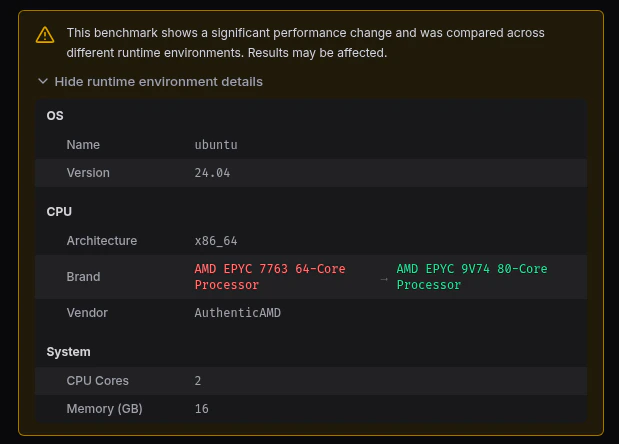
* **CPU model:** Different instruction sets, cache sizes, and microarchitectures
change simulated cache behavior.
* **System libraries:** Library versions can differ even on the same OS image if
it was updated between runs.
CodSpeed detects this and shows a warning:
 To fix this, use CodSpeed [Macro Runners](/features/macro-runners): dedicated
bare-metal machines where your benchmarks always run on the same hardware. If
you manage your own runners, pin them to a single CPU type.
For a deep dive, see our blog post [Why glibc Is Faster on GitHub
Actions](https://codspeed.io/blog/why-glibc-faster-github-actions), that
explores how CPU differences across CI runners cause benchmark variance.
## Compiler Non-determinism
**When can this happen?** Any change to the code or compiler can trigger
different compiler decisions. However, recompiling the entire codebase with the
same source code, compiler version, and flags is usually deterministic.
Compiling optimized code is hard, because it is a tradeoff between compilation
resource usage (speed, memory, ...), runtime execution speed and binary size,
because you don't want your simple code to take 1 hour to compile or take up 1GB
of disk space. This tradeoff is balanced by using heuristics and thresholds,
that cover most cases while being fast enough.
An example for this is **inlining**: By inlining a function, the overhead of a
call at runtime is removed and also allows the compiler to better optimize the
function body. However, if every function is inlined the binary would be much
bigger, which decreases the performance due to the
[increased instruction cache pressure](https://stackoverflow.com/questions/49334487/inlining-and-instruction-cache-hit-rates-and-thrashing).
There are many other optimizations that can affect cache behavior:
* **Basic block reordering**: Moving cold error paths into separate functions,
rearranging `if` branches, ...
* **Loop transformations**: Loop unrolling, peeling, fusing, ...
* **Bounds checks**: Compilers are often smart enough to eliminate bounds
checks, but if they are not, they may hinder loop unrolling/vectorization.
**How to detect this?** We recommend checking the cache misses and instruction
counts in the tooltip of the flame graph.
### Function Alignment
Do you think this function always has the same performance?
```asm theme={null}
; rax = rdi + rsi
foo:
mov rax, rdi
jmp label
; a lot of other code
label:
add rax, rsi
ret
```
The answer is, it depends.
The CPU fetches the next N instructions that should be executed and stores them
in the I-cache (Instruction Cache). If the label is far away from the `foo`
function, the CPU may need to fetch another cache line to get the instructions
after the `jmp label` instruction. This is counted as an instruction cache miss,
which may cost anywhere from 10-40 cycles (if found in L2/L3) to 100+ cycles (if
it goes all the way to RAM).
Because of that, compilers try to align functions and keep the hot paths close
to each other to minimize cache misses.
## Allocators
Most allocators are designed to be fast, while keeping fragmentation and memory
usage at a minimum. Just like compilers, they use heuristics to decide when to
allocate more memory, which can lead to unpredictable performance.
Here are some examples that can cause different performance:
* **Time-Based Memory Decay**: Allocators like
[jemalloc](https://github.com/jemalloc/jemalloc) implement "decay" logic,
where unused "dirty" memory pages are returned to the OS after a specific
duration (e.g., 10 seconds).
* **Adaptive Thread-Cache Sizing**: High-performance allocators (like
[tcmalloc](https://github.com/google/tcmalloc)) dynamically resize
thread-local caches based on "demand history."
* **Memory Fragmentation Patterns**: Allocation order determines fragmentation.
If one benchmark allocates 1MB while another allocates 64B, then the allocator
may have to allocate more memory to satisfy the larger request, leading to
fragmentation.
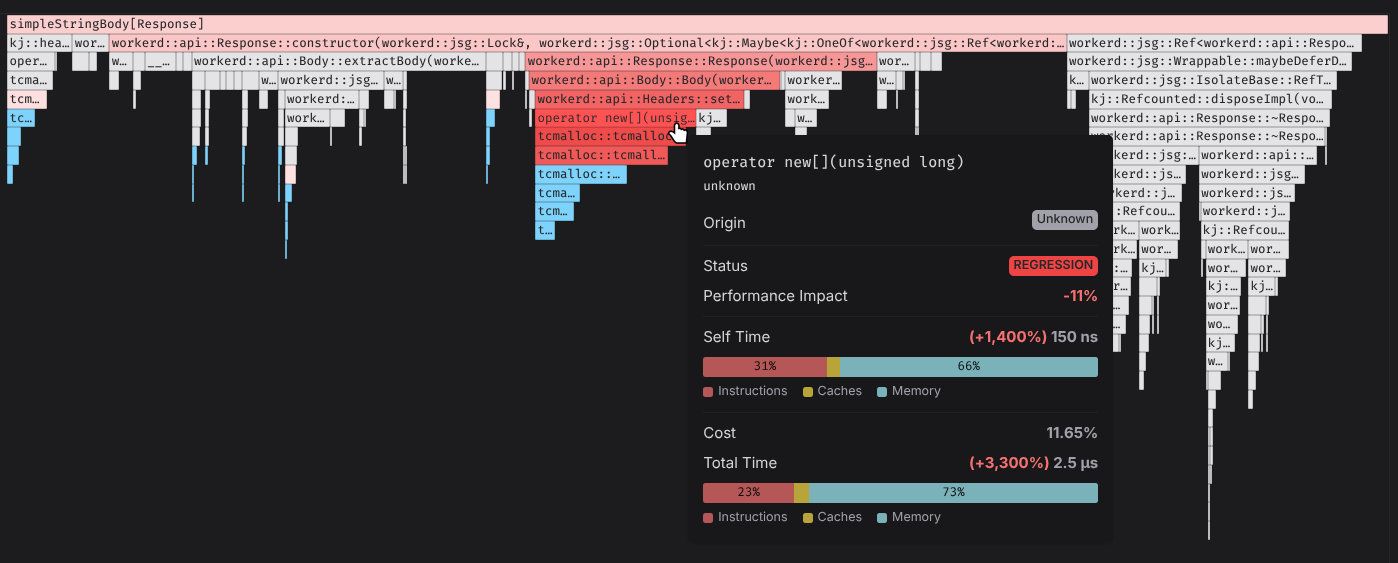
Detecting allocator regressions is straightforward, because we can see the
reduced performance of the allocator functions in the flame graph:
To fix this, use CodSpeed [Macro Runners](/features/macro-runners): dedicated
bare-metal machines where your benchmarks always run on the same hardware. If
you manage your own runners, pin them to a single CPU type.
For a deep dive, see our blog post [Why glibc Is Faster on GitHub
Actions](https://codspeed.io/blog/why-glibc-faster-github-actions), that
explores how CPU differences across CI runners cause benchmark variance.
## Compiler Non-determinism
**When can this happen?** Any change to the code or compiler can trigger
different compiler decisions. However, recompiling the entire codebase with the
same source code, compiler version, and flags is usually deterministic.
Compiling optimized code is hard, because it is a tradeoff between compilation
resource usage (speed, memory, ...), runtime execution speed and binary size,
because you don't want your simple code to take 1 hour to compile or take up 1GB
of disk space. This tradeoff is balanced by using heuristics and thresholds,
that cover most cases while being fast enough.
An example for this is **inlining**: By inlining a function, the overhead of a
call at runtime is removed and also allows the compiler to better optimize the
function body. However, if every function is inlined the binary would be much
bigger, which decreases the performance due to the
[increased instruction cache pressure](https://stackoverflow.com/questions/49334487/inlining-and-instruction-cache-hit-rates-and-thrashing).
There are many other optimizations that can affect cache behavior:
* **Basic block reordering**: Moving cold error paths into separate functions,
rearranging `if` branches, ...
* **Loop transformations**: Loop unrolling, peeling, fusing, ...
* **Bounds checks**: Compilers are often smart enough to eliminate bounds
checks, but if they are not, they may hinder loop unrolling/vectorization.
**How to detect this?** We recommend checking the cache misses and instruction
counts in the tooltip of the flame graph.
### Function Alignment
Do you think this function always has the same performance?
```asm theme={null}
; rax = rdi + rsi
foo:
mov rax, rdi
jmp label
; a lot of other code
label:
add rax, rsi
ret
```
The answer is, it depends.
The CPU fetches the next N instructions that should be executed and stores them
in the I-cache (Instruction Cache). If the label is far away from the `foo`
function, the CPU may need to fetch another cache line to get the instructions
after the `jmp label` instruction. This is counted as an instruction cache miss,
which may cost anywhere from 10-40 cycles (if found in L2/L3) to 100+ cycles (if
it goes all the way to RAM).
Because of that, compilers try to align functions and keep the hot paths close
to each other to minimize cache misses.
## Allocators
Most allocators are designed to be fast, while keeping fragmentation and memory
usage at a minimum. Just like compilers, they use heuristics to decide when to
allocate more memory, which can lead to unpredictable performance.
Here are some examples that can cause different performance:
* **Time-Based Memory Decay**: Allocators like
[jemalloc](https://github.com/jemalloc/jemalloc) implement "decay" logic,
where unused "dirty" memory pages are returned to the OS after a specific
duration (e.g., 10 seconds).
* **Adaptive Thread-Cache Sizing**: High-performance allocators (like
[tcmalloc](https://github.com/google/tcmalloc)) dynamically resize
thread-local caches based on "demand history."
* **Memory Fragmentation Patterns**: Allocation order determines fragmentation.
If one benchmark allocates 1MB while another allocates 64B, then the allocator
may have to allocate more memory to satisfy the larger request, leading to
fragmentation.
Detecting allocator regressions is straightforward, because we can see the
reduced performance of the allocator functions in the flame graph:
 ## HashMaps
Most hash map implementations randomize their hash seed on every program start.
Rust's `std::collections::HashMap`, Python's `dict`, and Go's `map` all do this
by default. The reason is security: a fixed seed lets an attacker craft inputs
that all hash to the same bucket, turning O(1) lookups into O(n) and creating a
denial-of-service vector (HashDoS).
For a benchmark, that randomization shows up as run-to-run variance even when
the input is identical:
* **Bucket layout**: Keys land in different buckets between runs. Probe
sequences differ, which changes the cache lines touched on each lookup.
* **Iteration order**: Iterating a `HashMap` produces a different order on every
run, so any work that depends on iteration order (allocations, recursive
calls, downstream hashing) takes a different path.
* **Resize timing**: With a different bucket distribution, the map hits its
load-factor threshold at a different insertion, shifting where the next
allocation happens and how big the peak working set gets.
To remove this source of variance, swap the default hasher for a deterministic
one in your benchmark, or use an ordered container like `BTreeMap` if iteration
order matters.
## Filesystem Iteration Order
Reading a directory on Linux using (e.g. using
[`readdir`](https://man7.org/linux/man-pages/man3/readdir.3.html), or libraries
built on top of it) does not return entries in any particular order. The reason
for this is that the underlying implementations vary based on the filesystem
(ext4, btrfs, xfs all behave differently). This means that the benchmarks can be
fully deterministic when run on a single machine (and therefore the same
filesystem), but show significant variance when run on different filesystems.
Changes in the filesystem iteration order can have an impact on:
* **Cache behavior**: Files get processed in a different order, so the data
loaded into the page cache and the CPU caches differs between runs.
* **Allocation order**: When per-file work allocates, the allocator sees a
different request sequence. Peak memory and fragmentation change even though
the total work is identical.
* **Order-dependent code**: Anything downstream that consumes the iteration
order (sorting later, hashing into a map, writing output) takes a different
path.
To remove this source of variance, sort the directory entries before iterating
over them.
## Next Steps
Now that you understand the common causes of benchmark regressions, you can use
CodSpeed's profiling tools to identify them in your code.
Learn how to read flame graphs and find performance bottlenecks
Learn strategies to reduce variance in your benchmarks
## HashMaps
Most hash map implementations randomize their hash seed on every program start.
Rust's `std::collections::HashMap`, Python's `dict`, and Go's `map` all do this
by default. The reason is security: a fixed seed lets an attacker craft inputs
that all hash to the same bucket, turning O(1) lookups into O(n) and creating a
denial-of-service vector (HashDoS).
For a benchmark, that randomization shows up as run-to-run variance even when
the input is identical:
* **Bucket layout**: Keys land in different buckets between runs. Probe
sequences differ, which changes the cache lines touched on each lookup.
* **Iteration order**: Iterating a `HashMap` produces a different order on every
run, so any work that depends on iteration order (allocations, recursive
calls, downstream hashing) takes a different path.
* **Resize timing**: With a different bucket distribution, the map hits its
load-factor threshold at a different insertion, shifting where the next
allocation happens and how big the peak working set gets.
To remove this source of variance, swap the default hasher for a deterministic
one in your benchmark, or use an ordered container like `BTreeMap` if iteration
order matters.
## Filesystem Iteration Order
Reading a directory on Linux using (e.g. using
[`readdir`](https://man7.org/linux/man-pages/man3/readdir.3.html), or libraries
built on top of it) does not return entries in any particular order. The reason
for this is that the underlying implementations vary based on the filesystem
(ext4, btrfs, xfs all behave differently). This means that the benchmarks can be
fully deterministic when run on a single machine (and therefore the same
filesystem), but show significant variance when run on different filesystems.
Changes in the filesystem iteration order can have an impact on:
* **Cache behavior**: Files get processed in a different order, so the data
loaded into the page cache and the CPU caches differs between runs.
* **Allocation order**: When per-file work allocates, the allocator sees a
different request sequence. Peak memory and fragmentation change even though
the total work is identical.
* **Order-dependent code**: Anything downstream that consumes the iteration
order (sorting later, hashing into a map, writing output) takes a different
path.
To remove this source of variance, sort the directory entries before iterating
over them.
## Next Steps
Now that you understand the common causes of benchmark regressions, you can use
CodSpeed's profiling tools to identify them in your code.
Learn how to read flame graphs and find performance bottlenecks
Learn strategies to reduce variance in your benchmarks